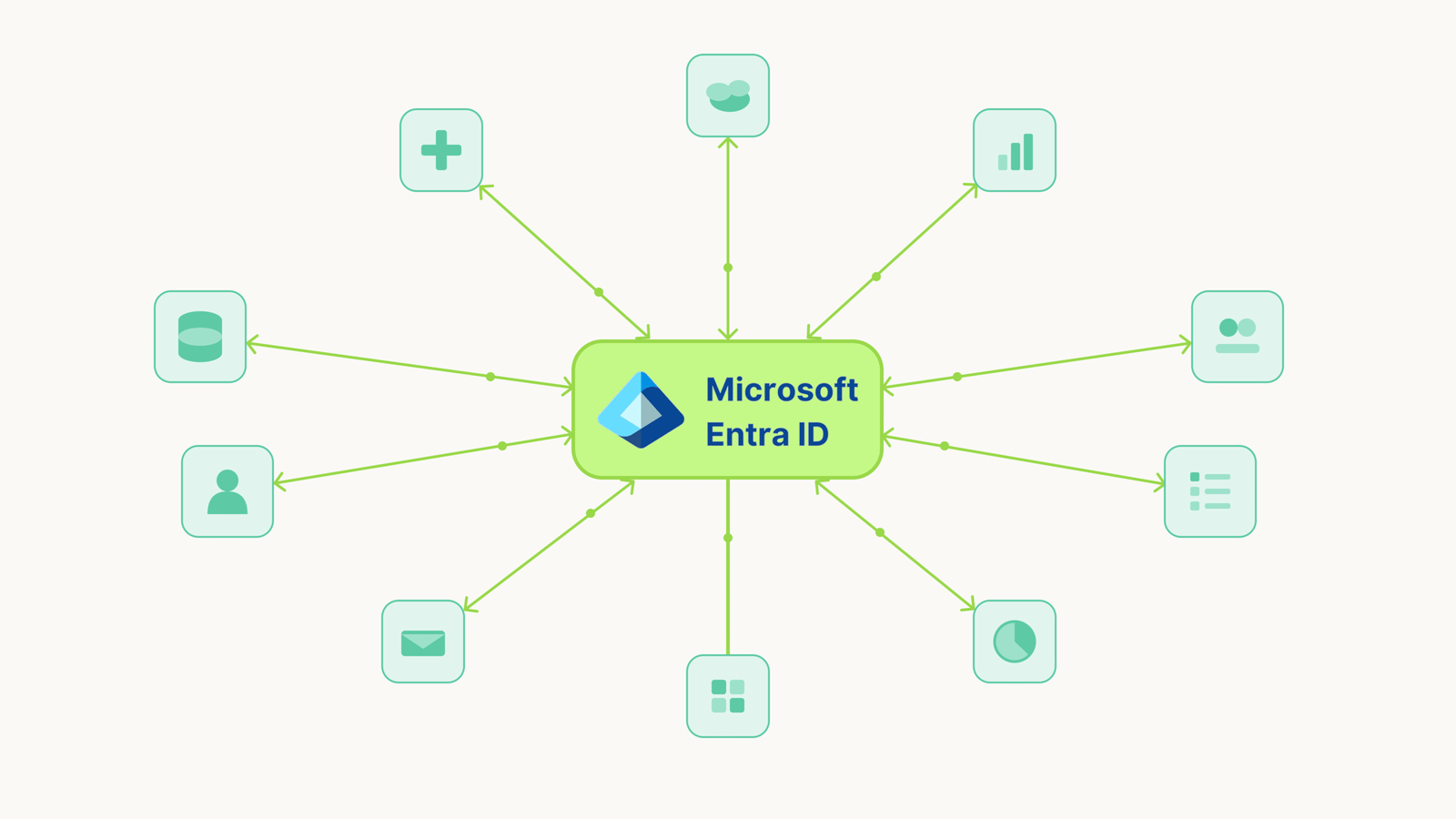
You’ve built your identity program around Microsoft Entra ID. It’s your authority for users. It handles authentication. For apps with SCIM support, it automates the entire identity lifecycle: provisioning, authentication, access reviews, deprovisioning.
But not every app supports SCIM. Not every app has a usable API. And the Entra gallery doesn’t have a connector for that legacy HR system, that industry-specific tool, or that niche app your marketing team swears by.
So what do you do with these apps?
In my experience, most teams end up in one of two places: they either ignore these apps entirely (pretending they’re not in scope), or they manage them manually (tickets, spreadsheets). Neither option is sustainable.
Let me break down the problem into its component parts – connectivity, lifecycle automation, and reconciliation – and look at how to actually solve it.
Problem 1: Connectivity
The first problem is basic: you can’t connect to the app programmatically.
For apps with SCIM endpoints or gallery connectors, Entra handles this natively. You configure the integration, map attributes, and you’re done.
For apps without SCIM, without a gallery connector, and without a usable API — there’s no standard integration path. The app has an admin UI where you create accounts manually, but nothing Entra can call.
Problem 2: JML Automation
When an app isn’t connected to Entra, you lose the entire identity lifecycle.
Joiner: Someone new starts. For connected apps, Entra provisions their account automatically based on role or group membership. For disconnected apps, someone creates a ticket, waits for approval, logs into the app’s admin console, and creates the account manually. Days pass. The new employee waits.
Mover: Someone changes roles. For connected apps, Entra updates their permissions automatically. For disconnected apps, maybe someone notices the role change and adjusts access. Maybe they don’t. Permissions accumulate.
Leaver: Someone departs. For connected apps, Entra deprovisions access immediately. For disconnected apps, someone needs to remember to create a ticket. Someone else needs to log into each app and remove the account. If they forget (and they often forget) that former employee still has access.
Problem 3: Reconciliation
Let’s say you’ve accepted the manual JML burden. You’ve built processes. You create tickets for onboarding. You have an offboarding checklist. It’s not elegant, but people follow it.
Here’s the question: how do you know it’s working?
- You think you deprovisioned someone. The ticket says closed. But did someone actually remove the account? You’d have to log into the app and check.
- You think you know who has access. Entra shows who should have access based on your manual group assignments. But the app might have accounts that bypassed your process entirely created directly by a department admin to work around slow ticket queues, created for a contractor who’s long gone.
- You think permissions are correct. But someone might have elevated their own access inside the app. Or a manager granted extra permissions outside your workflow.
Without a connection pulling data back from the app, Entra only knows what you’ve manually told it. The app is the actual source of truth — and you can’t see it.
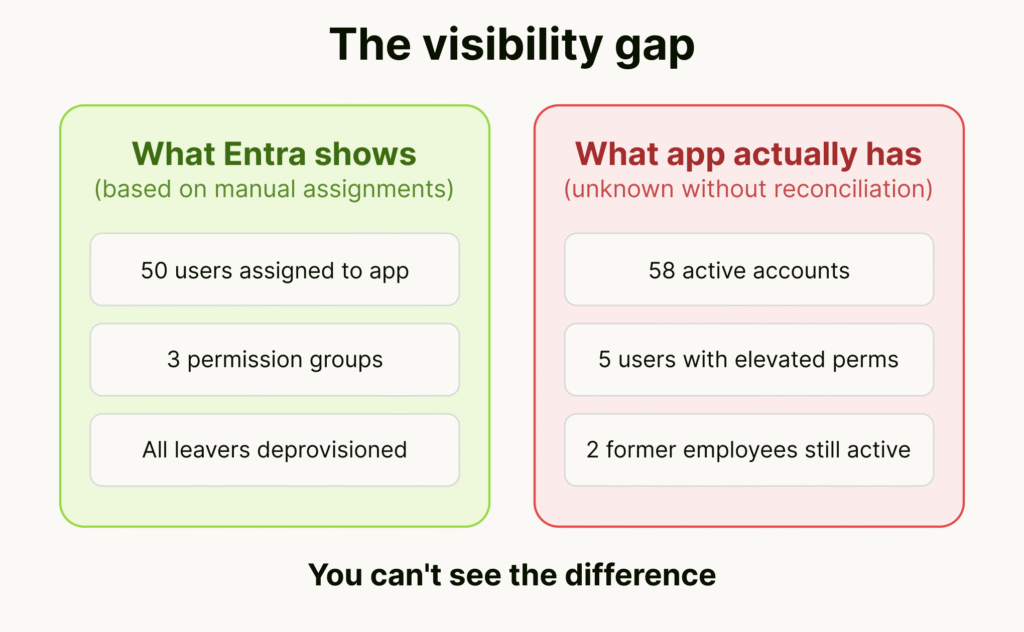
Over time, the gap between “what Entra says” and “what actually exists in the app” grows. Rogue accounts accumulate. Orphaned access persists. And you won’t find out until an auditor asks or an incident happens.
How to Evaluate Your Situation
If you’re dealing with SCIM-less apps, here’s how I’d approach the assessment:
1. Inventory your apps.
Pull Enterprise Applications from Entra. Which have provisioning configured? Which are SSO-only (authentication but no lifecycle)? Then find apps outside Entra entirely: check expense reports, procurement records, ask department heads. The shadow IT you don’t know about is often where the biggest risks hide.
2. Categorize by integration capability.
For each app outside Entra’s provisioning:
- Does it have SCIM support you haven’t configured yet?
- Does it have an API you could realistically build against?
- Does it have neither – just an admin UI?
The third category is where the hardest problems live.
3. Assess by risk.
For each SCIM-less app:
- How many users does it have?
- How often do people join, move, or leave?
- What data does the app handle? Is it in compliance scope?
- What’s the current JML process? How often does it fail?
4. Match approach to scale.
- 1-2 low-risk apps: Manual processes may be acceptable. Document them well.
- Critical app with a good API: Custom development might be worth the investment.
- 10+ SCIM-less apps: The economics shift. Per-app development doesn’t scale. You need an approach that works across apps without custom code for each.
Your Options
Let me walk through the available options and show what each actually solves.
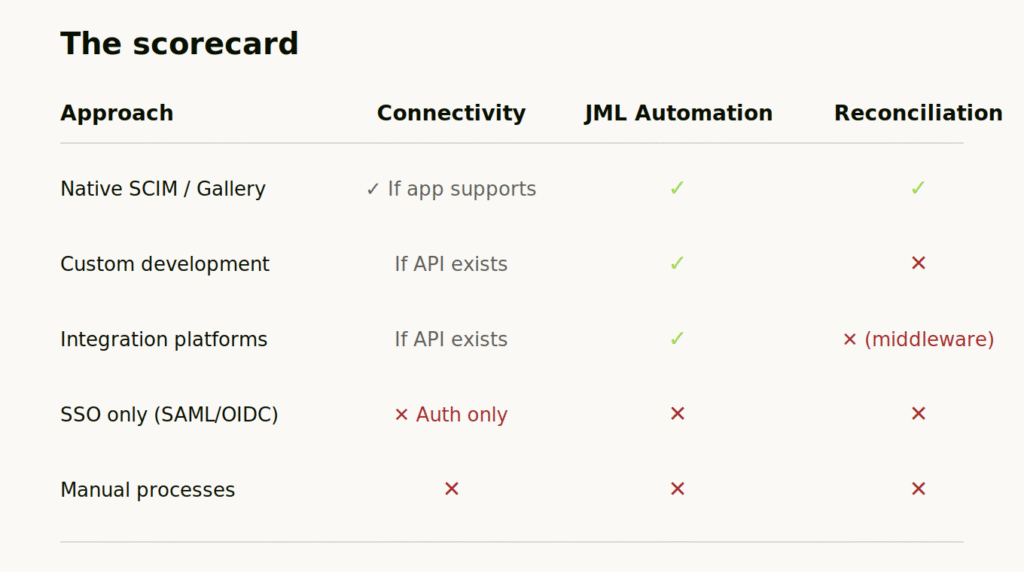
Native Entra Integration (SCIM & Gallery Connectors)
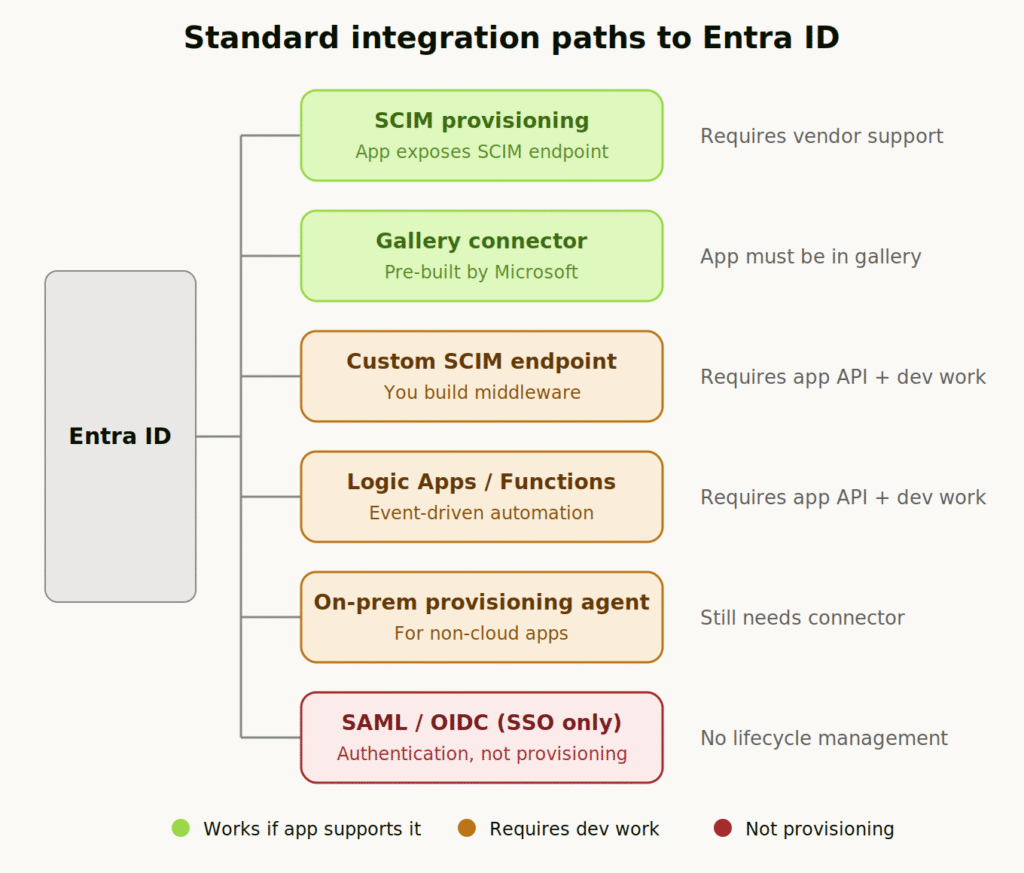
The ideal path. If the app exposes a SCIM 2.0 endpoint, or if Microsoft has built a gallery connector, you configure it in Entra and everything works:
- SCIM provisioning: Entra calls the app’s SCIM endpoint to create, update, and delete users. Attribute mapping in the portal. Full provisioning logs.
- Gallery connectors: Pre-built by Microsoft for thousands of apps. Some use SCIM, others use app-specific APIs.
The catch: The app has to support it.
Solves: All three – if the app supports it.
Doesn’t solve: Apps without SCIM or gallery support.
Custom Development (SCIM Middleware, Logic Apps, Azure Functions)
If the app has some kind of API (even a proprietary REST API), you can build your own integration:
- Custom SCIM endpoint: Build middleware that sits between Entra and the app. Entra calls your SCIM endpoint, your code translates and calls the app’s API.
- Logic Apps / Azure Functions: Listen to Entra events (user created, user disabled, group membership changed) and make API calls to the app.
- Entra provisioning agent: For apps that aren’t cloud-accessible, Microsoft’s agent can run in your environment, but it still requires the app to have some integration path.
This works. I’ve seen teams do it successfully for critical apps. But you’re taking on real costs:
- Development time to build the initial integration
- Ongoing maintenance when the app’s API changes
- Debugging when Entra’s event schema updates
- Per-app effort — nothing you build for one app helps with the next
For one or two critical apps, maybe worth it. For 10 apps? You’re running a full-time integration team. For the typical organization that has hundreds of apps, this is un-attainable.
The gap most teams miss: Custom connectors push commands to the app, but they don’t pull state back. You can automate provisioning, but you still can’t verify what actually exists.
Solves: Connectivity (if API exists), JML automation.
Doesn’t solve: Reconciliation. Apps without any API.
Integration Platforms (Workato, Tray.io, etc.)
Integration platforms give you a more structured way to build the same thing. Pre-built connectors for common APIs. Visual workflow builders. Better error handling than raw code.
They’re useful for orchestrating complex multi-system workflows. But the fundamental constraints remain:
- The app still needs to expose an API
- You still configure each app separately
- State lives in the integration platform, not natively in Entra
You can build workflows that include provision and deprovision. But reconciliation isn’t what these tools are designed for. You’re syncing through middleware, not into your directory.
Solves: Connectivity (if API exists), JML automation.
Doesn’t solve: Reconciliation (state lives in middleware). Apps without API.
SSO-Only (SAML/OIDC)
Worth mentioning because teams sometimes confuse this with provisioning: configuring SSO means users authenticate through Entra. That’s valuable, you control the front door.
But SSO doesn’t provision accounts. Doesn’t manage permissions. Doesn’t handle deprovisioning. The app still needs accounts created somehow, and those accounts persist after you disable the user in Entra.
Solves: Authentication.
Doesn’t solve: Connectivity, JML automation, or reconciliation.
Manual Processes
This is where most teams actually end up: documented runbooks, offboarding checklists, quarterly access reviews, spreadsheet-based reconciliation. It’s not elegant, but you know the limitations and you work within them.
The problems are obvious:
- Doesn’t scale. Every new app adds operational burden.
- Depends on humans remembering to follow process.
- No continuous reconciliation — just periodic snapshots.
- Audit evidence is spreadsheets and screenshots.
For a handful of low-risk apps, this might be acceptable. But it’s managing risk, not eliminating it.
The Agentic Approach
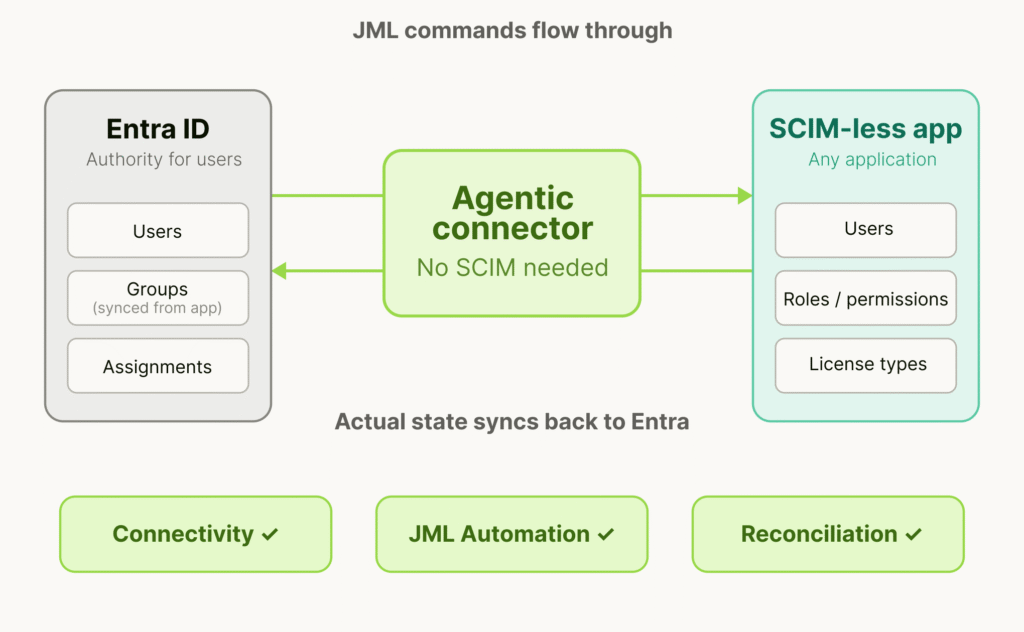
What if you could bring any app into Entra governance, including apps without SCIM or API, and have it work like a native integration?
This is what agentic approach enables. Agentic IGA is an identity governance approach where autonomous agents discover, assess, and handle traditional joiner-mover-leaver processes without the limitations of legacy connectors and API connectivity.
Worth mentioning, this isn’t RPA. Traditional robotic process automation records clicks and replays them. It’s brittle, and when the UI changes, the automation breaks. Additionally, RPA has a hard time understanding user lists and data so will not be able to aggregate existing users into a meaningful format that the governance platform understands. Agents understand application patterns and adapt when interfaces change. They’re not replaying a script; they’re accomplishing a task.
What This Looks Like in Practice
StackBob.ai is an excellent example of agentic IGA solution built specifically for this problem. It works alongside existing Entra deployments without replacement, migration or re-architecture and also eliminates the need for enterprise-tier licensing to obtain SCIM/APIs .
How it helps?
- Initial setup. Instead of the multi-week data normalization project exporting CSVs, cleaning data, matching users in spreadsheets, creating groups manually, you connect the app and ingestion happens automatically. The app’s users and permission model become native Entra groups and assignments. What used to take weeks takes hours.
- Ongoing JML. When someone joins, moves, or leaves in Entra, signals are syncrhonized to the app and changes are applied directly in the app.
- Drift detection. When a local admin creates an account directly in the app, bypassing Entra, reconciliation identifies it immediately. It surfaces as a discrepancy: “This account exists in the app but has no corresponding assignment in Entra.” Same for permission changes, role escalations, shadow accounts.
- Audit evidence. You can prove at any time that access in Entra matches what actually exists in the application. Documented, timestamped, verifiable. Not spreadsheets and screenshots – actual system-of-record data.
The key insight: app state lives natively in Entra, not in a separate dashboard. Entra becomes the actual source of truth, even for apps that were previously impossible to govern.
Final Thoughts
SCIM-less apps aren’t going away. Vendors aren’t suddenly going to prioritize identity standards. Your compliance obligations don’t care whether an app has a gallery connector.
The question is whether you govern these apps or pretend they don’t exist.
Governing them properly requires solving all three problems: connectivity, JML automation, and reconciliation. Solving connectivity alone isn’t enough if you still have manual processes. Automating JML isn’t enough if you can’t verify what actually exists. You need the complete loop.
That’s what makes Entra the actual source of truth for every app in your environment.


